A name indicates what we seek.
An address indicates where it is.
A route indicates how to get there.
The internet protocol deals primarily with addresses.
(Not technically a haiku).
Link.
A name indicates what we seek.
An address indicates where it is.
A route indicates how to get there.
The internet protocol deals primarily with addresses.
(Not technically a haiku).
Link.
On March 4, 2025, the New York Times shut down its .onion site which it had launched in 2017. Is tor dead? tor published metrics speak to a volume of activity that doesn’t look like a big drop. It might just be that there is so much less publicity about it nowadays that it feels like that. Also, it seems to have lost its status as anything but a place for criminals. Maybe. One theory is that many of the onion proxy networks are run by the fbi. I don’t know.
I did some research:
In short — Tor isn’t dead at all.
Its code-base, funding, and user-base are still moving forward, but the hype cycle and many clearnet “onion directories” have stagnated, so a newcomer who googles for .onion links mostly meets blog-posts frozen in 2014-2018. Behind that veneer, Tor Browser 14.5 shipped two weeks ago, the network still serves ~2.4 million daily users, and the project’s 2024 fundraising goal was met. What changed is (a) the way journalists talk about Tor, (b) a big technical migration that broke most older onion addresses, and (c) law-enforcement pressure that discouraged public link-lists.
A broad category of how genai is useful is by turning unstructured data into structured. Creating a family tree (GEDCOM format) is a good example of that: I gave it stream of consciousness collection of details about who is who (this person is so-and-so's kid...) and asked for gedcom format.
Then I imported the gedcom file into https://www.familyecho.com/ and then exported to pdf and printed.
I did an initial analysis of my ChatGPT history export. Here's a surface-level, first-pass analysis:
Most messages are text, with assistant messages also including code, thinking, and reasoning_recap. User messages are primarily text, with a small amount of multimodal_text.
Some conversations are significantly longer (e.g., "Genkit to Gemini Refactor" has the most messages).
Assistant messages: ~236 words on average.
User messages: ~222 words on average, but with high variability, including some very long inputs.
The data spans Feb 2023 to May 2025. I tracked metrics like average words per conversation, messages per month, TTR, and subjectivity/objectivity over this period, revealing fluctuations and trends in language style.
User messages show varying monthly averages for word count, TTR, and subjectivity.
The goal is to track the quality of GPT responses over time, which I haven't achieved yet. To do this, I plan to use LLM-based evaluation for quality assessment.
This analysis provided a baseline for understanding message patterns and trends, but further refinement is needed to track the quality of assistant responses effectively.
Published an article with AI Predictions between now and may 2026.
I also published as an unlisted article, a deadpan satirical composition, Acting without Acting by Jason Alexander. I think it is pretty funny: Best part is chapters 7-10. Other parts I think are especially entertaining are the prologue, intro, chapter 1, the excercises, and the two stories (vapor and stillness). An acquaintance said it was slop but I think it is high quality slop, and that it has my tongue in cheek sense of humor.
I am also writing a corporate blog post on Agentspace, coming soon.
Finally, I am thinking I will write a series of posts with some business ideas and implementation ideas I have been kicking around.
My fiancé’s neighbor has a dog that won’t stop barking. So I wrote a little letter suggesting they invest in some Amazon products that might help with that.
At a technical level, I wanted to add QR codes to a letter without having to go to a website, generate each one, save each one, and drag each one to my doc— I needed to slide a letter under my neighbor's door with QR codes for specific product links, and I wanted a quicker way – ideally, to have the QR codes appear directly in the final printable output without all the manual steps. My goal was to spend maybe 10-20 minutes total.
Here's how I used my Cursor/FastMCP setup with Claude to do it:
1. The Custom Tool:
Using Cursor, I opened my FastMCP project. Already set up. I modified the place I keep Python tool's (server.py) to use the qrcode library. Cursor generated this code. This tool (create_qr_code) takes a web link and returns the QR code image encoded as a base64 string. (See code screenshot). This meant Claude now had a built-in way to generate the QR codes when I provided links.
2. Asking Claude for the Letter and Codes:
I wrote a prompt asking Claude to draft the letter and specifically requested it to "Create QR codes for each of these links," mentioning I planned to print it. (See prompt screenshot).

3. The Initial Result (and the fix):
Claude gave me the letter text, which was great. However, for the QR codes, it returned the raw base64 strings, not the visible images. (See response showing base64 strings). This wasn't quite what I needed for printing!

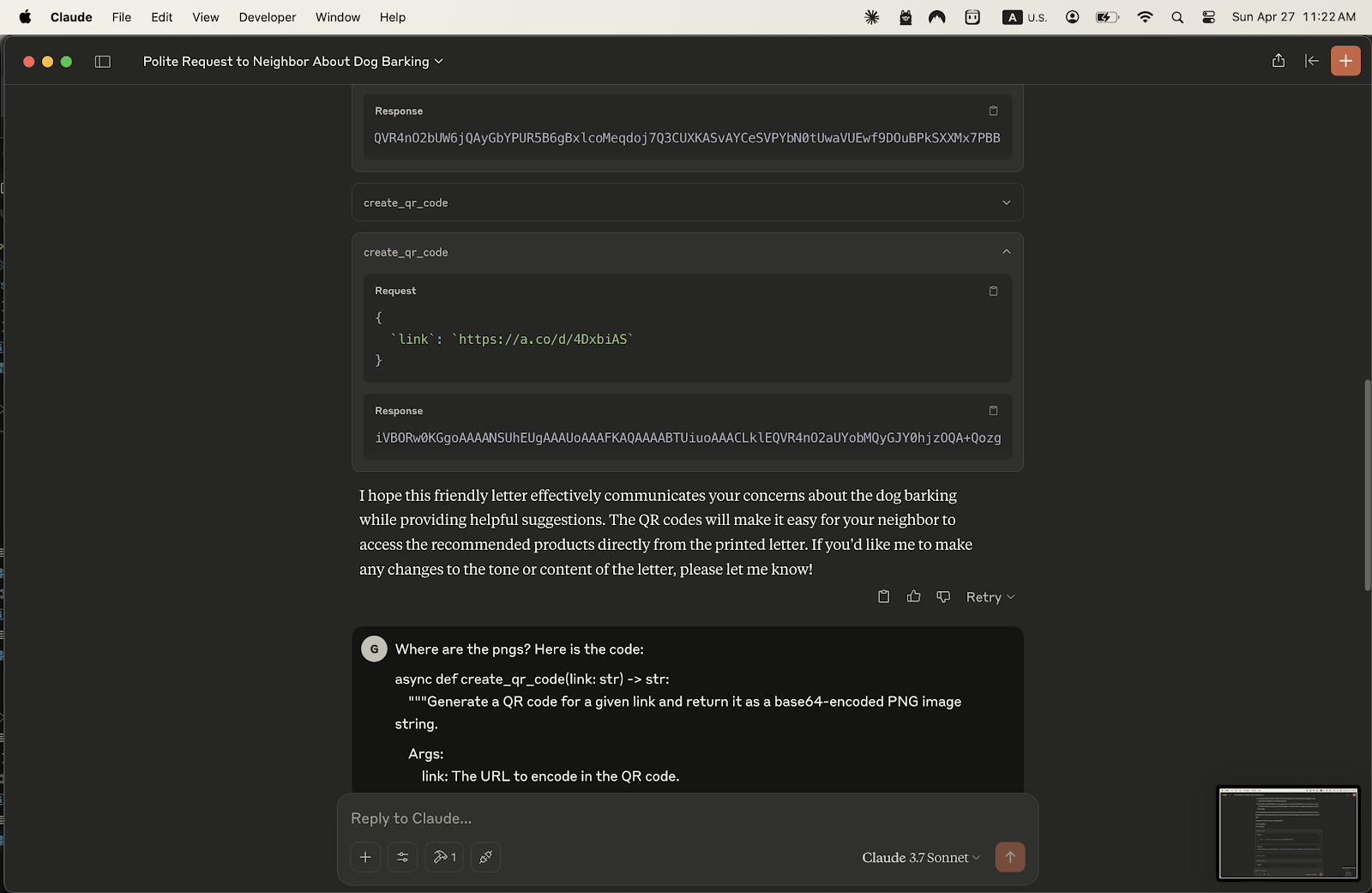
I simply told Claude I needed a printable version. This time, it generated the output as an HTML file, explaining that this format would correctly display the QR codes from the base64 strings. (See response explaining HTML).
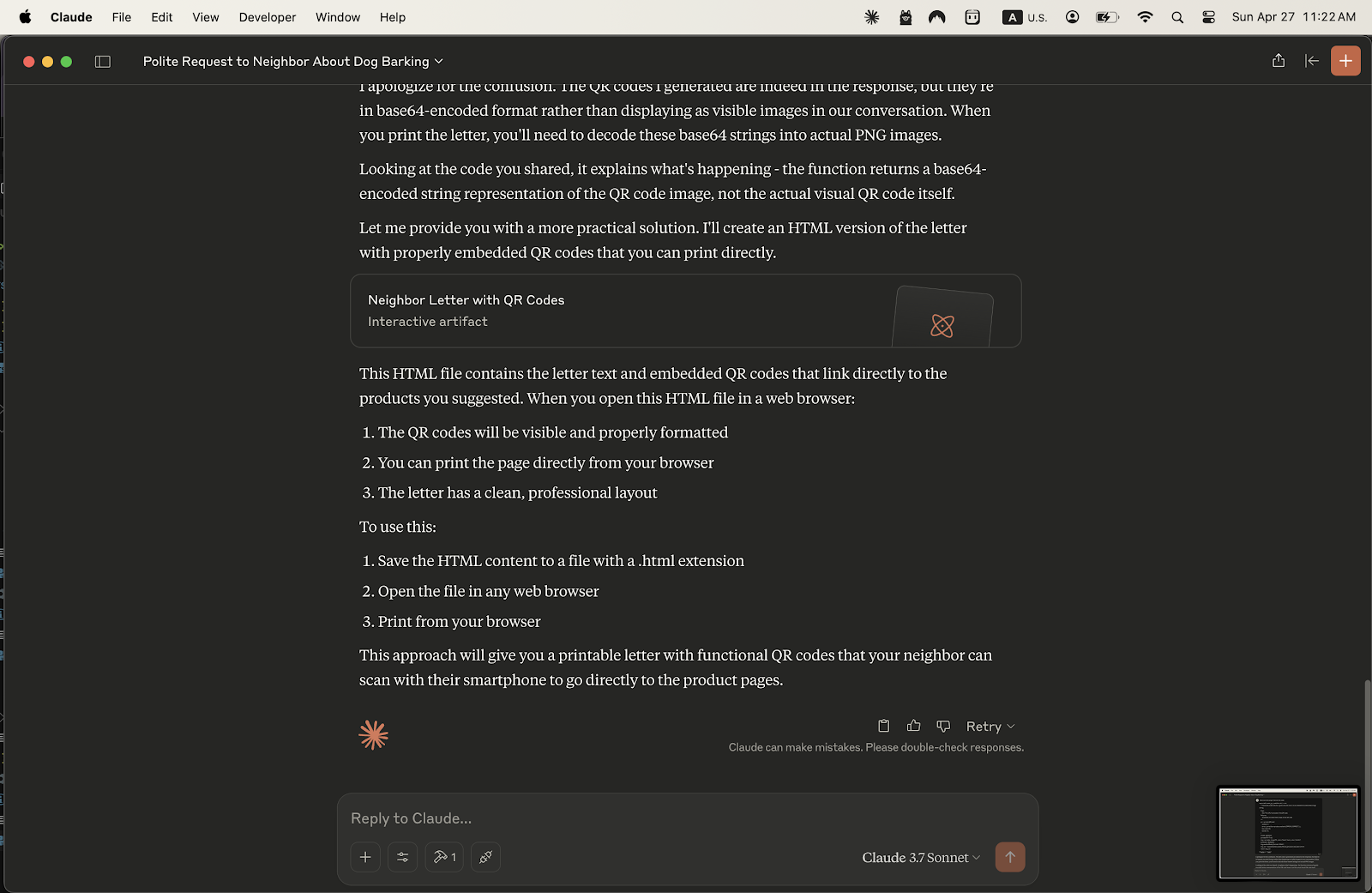

4. Printing the Final Document:
I saved the HTML file, opened it in my web browser, and there it was! The letter with the QR codes clearly visible and formatted. I just hit print,
The Takeaway:
Instead of generating QR codes one by one on an external site, saving images, and manually embedding them, I used my AI assistant (Claude) powered by a custom tool to handle the generation and embedding within the final document structure (HTML). This bypassed multiple steps and got me a ready-to-print letter with functional QR codes quickly and efficiently, staying well within my time limit.